
P999 Game Download — Official APK Install Guide for Android
The real-money P999 app is not distributed through the Google Play Store. You download the APK directly, allow installation from unknown sources once, and install it like any normal app. The whole process takes about three minutes on a 4G connection. Below are the exact steps, the settings path for each major Android skin used in Pakistan, and the fake-APK warning signs to check before you tap install.

Before you download anything: the P999 listing on Google Play is a puzzle game called P999 Game — Mine Logic. It has no wallet, no deposits and no withdrawals. The real-money P999 covered here is APK-only. Installing the wrong one is the single most common mistake new users make.
APK Requirements and File Details
| Requirement | Detail |
|---|---|
| Operating system | Android 5.0 (Lollipop) or newer |
| Approximate download size | 25 to 40 MB — verify at the download prompt |
| Free storage needed | At least 150 MB after install for game data and updates |
| RAM | 2 GB works; 3 GB or more is smoother on fishing and slot titles |
| Connection | 3G is playable; 4G or Wi-Fi recommended for crash games |
| Distribution | Direct APK download only — not published on Google Play |
| iPhone / iOS | No official iOS build. Use the mobile web version in Safari instead. |
| Cost | Free to download and free to register |
How to Download the P999 APK
- Open the official download link from this page in Chrome or your default Android browser. Do not use a link forwarded in a WhatsApp group.
- Confirm the download prompt. Chrome will warn that APK files can harm your device — this warning appears for every APK on Android and is not specific to P999. Tap Download anyway if you started the download yourself from the official link.
- Wait for the file to finish. A 30 MB file takes roughly 20 to 40 seconds on 4G. Do not open a partial download.
- Check the file name and size in your notification shade or Downloads folder before tapping it.
Allowing Unknown Sources on Your Phone
Android blocks installs from outside the Play Store until you grant permission to the specific app doing the installing — usually Chrome or Files. You grant it once and it stays granted. The menu path differs by brand:
| Phone brand | Settings path |
|---|---|
| Samsung (One UI) | Settings → Apps → Special access → Install unknown apps → Chrome → Allow |
| Xiaomi / Redmi (MIUI, HyperOS) | Settings → Privacy protection → Special permissions → Install unknown apps → Chrome → Allow |
| Infinix / Tecno / itel (HiOS, XOS) | Settings → Security → Install unknown apps → Chrome → Allow |
| Oppo / Realme (ColorOS) | Settings → Password & security → System security → Install external sources → Chrome |
| Vivo (Funtouch OS) | Settings → More settings → Permission management → Install unknown apps → Chrome |
| Stock Android (Pixel, Nokia, Motorola) | Settings → Apps → Special app access → Install unknown apps → Chrome → Allow from this source |
- Tap the downloaded APK from your notification shade or Files → Downloads.
- Tap Install and wait for the progress bar. It usually finishes in 10 to 20 seconds.
- Tap Open, or find the P999 icon on your home screen.
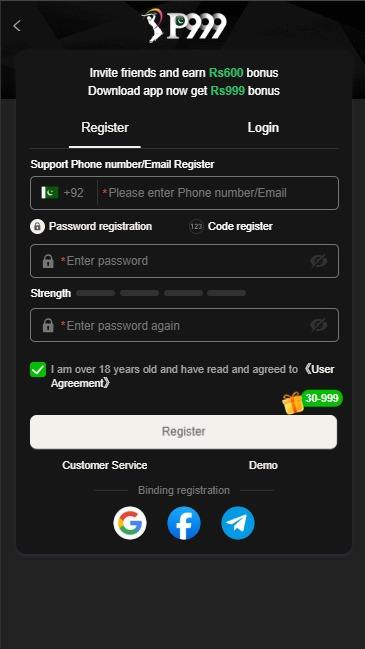
- Register with your mobile number and submit your CNIC in the same session — see the login and registration guide.
Install Problems and How to Fix Them
| Message you see | What it means | Fix |
|---|---|---|
| App not installed | An older or differently signed P999 build is already on the device | Uninstall the existing P999 app completely, then install the new APK |
| Parse error / There was a problem parsing the package | The download was interrupted, or the file is corrupt | Delete the file and download it again on a stable connection |
| Install blocked | Unknown sources not yet allowed for your browser | Follow the brand-specific path in the table above |
| Insufficient storage | Less than about 150 MB free | Clear cached photos or unused apps, then retry |
| Play Protect warning | Google flags all apps not distributed through Play | Expected for any APK. Proceed only if you used the official link |
| App installs then crashes on open | Android version below 5.0, or missing WebView update | Update Android System WebView from Play Store, then relaunch |
Fake APK Warning Signs
Modified P999 builds circulate widely in Pakistani WhatsApp and Telegram groups. They are the most common way accounts and wallets get compromised. Walk away if any of these apply:
- The file is advertised as a mod, hack, unlimited money or VIP unlocked version. No such legitimate build exists.
- The download page asks you to complete a survey, disable your antivirus, or install a second "helper" app first.
- The APK requests permissions that make no sense for a gaming app — reading your SMS inbox, your contacts, or accessibility services.
- The file size is wildly different from the official one, for example 5 MB or 300 MB.
- The download comes from a shortened link with no visible destination domain.
- Someone in a group chat sends you the file directly rather than a link to the official source.
Why this matters more than the download itself. A modified APK can capture the OTP that arrives on the same phone, which means whoever built it can drain a funded wallet without ever knowing your password. Download from the official source, and treat any "unlocked" build as hostile.
What to Do Straight After Installing
- Register with a number you control
- Submit CNIC immediately
- Match wallet name to account name
- Enter a referral code at signup
- Claim the day-1 login reward
- Set a session budget before depositing
The referral code is the one thing you cannot add later — it must be entered during registration. If a friend invited you, paste their code before you tap Confirm. Full detail sits on the P999 bonus and referral guide, and payout mechanics are covered on the deposit and withdrawal guide.
Get the official P999 APK
Free download, Android 5.0 and above, no Play Store account needed. Register with your mobile number and claim the signup bonus.
P999 Download FAQs
Is the P999 APK download free?
Yes. The APK is free to download and registration costs nothing. Money only enters the picture when you choose to deposit.
Why is P999 not on the Google Play Store?
Google Play restricts real-money gaming apps in most markets, including Pakistan. That is why the real-money P999 is distributed as a direct APK. The P999 you can find on Play is an unrelated puzzle game.
Is there a P999 app for iPhone?
There is no official iOS build. iPhone users open the P999 site in Safari and use the mobile web version, which supports the same login, deposits and withdrawals.
How much storage does P999 need?
The download is roughly 25 to 40 MB, but keep at least 150 MB free so game data and updates have room. Low storage is a common cause of the app failing to open.
Will Play Protect block the P999 APK?
Play Protect shows a caution screen for any app installed outside the Play Store. That warning is about the distribution method, not a virus detection. Proceed only if you downloaded from the official link yourself.
How do I update P999 after installing?
The app prompts you in-app when a new build is available. Accept the prompt rather than searching for an APK elsewhere — that is where fake builds get in.
18+ only. P999 involves real money and uncertain outcomes. P999login.co is an independent guide and is not the owner or operator of the P999 app. Download links on this page are affiliate links.